

High-level Flow
1
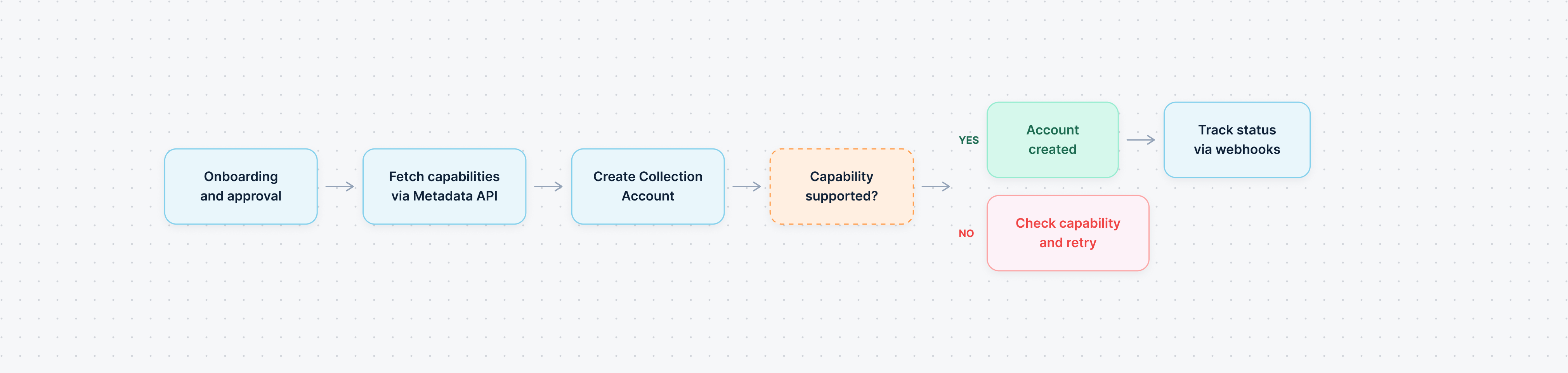
Onboarding and Approval
Related Link: Entity Onboarding
2
Check the Metadata API
Call the Collection Account Metadata API to discover:
- Available payment method types for your account
- Supported currencies and domicile countries
- Transfer limits and other features
This is an optional step and can be skipped if you already have the capabilities and coverage.
3
Create the Account
Call the Collection Account Creation API with your requirements (account type, country, currencies, and payment method type).If Tazapay can fulfill the requirements, a Collection Account object is created with status
disabled and an initial enablement request.Related Link: Collection Account Status Flow
4
Track via Webhooks
Subscribe to webhook events to receive real-time status updates as the enablement request progresses. Once the request succeeds, the account status changes to
enabled and is ready to receive funds.Collection Account Status Flow
Every Collection Account has a status - eitherenabled or disabled. This helps identify whether it can currently receive funds.
The status is determined by the state of requests associated with the account. Each time you want to enable, disable, or re-enable an account, a request is created and goes through its own lifecycle. The account status updates automatically based on how that request progresses.
There are two types of requests:
Each request moves through its own set of states — such as
processing, requires_action, approval_hold — before reaching a terminal state (succeeded, failed, or cancelled). The account status at any point reflects the outcome of the most recent request.
The diagram above shows the enablement request flow. For disablement, the account status transitions are reversed (See the table below).
What Each State Means
The states in the diagram are the states of a collection account request (the requests can be of types enablement or disablement). They are not the status of the collection account itself. The account’s status -enabledordisabled- is what tells you whether it can receive funds at that point in time, and it is derived from how the latest request progresses (See Status by Request State below).
Status by Request State
Webhook Events
Subscribe to thecollection_account.* webhook events to track the full lifecycle of your creation and disablement requests.
Request via Dashboard
Self-serve creation from the Tazapay dashboard (no-code)