
Self-serve requesting via API is currently in Beta. Endpoints, fields, and webhook payloads may change while we stabilize the flow. For any issues, contact support@tazapay.com.
Before creating a collection account, call the Metadata API to discover which account types, currencies, and payment method types are available for your account.
High-level Flow
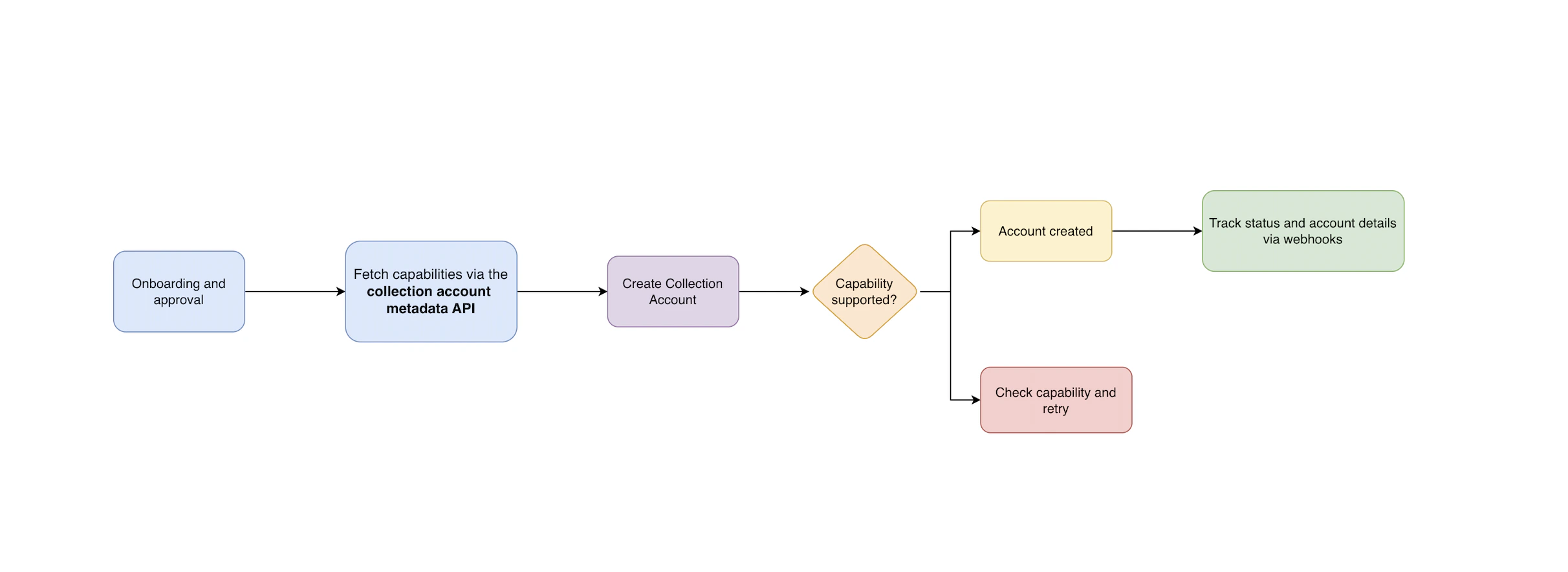
Onboarding and Approval
Ensure you or your entity has been onboarded on Tazapay and approved by our team before making API calls.
Check the Metadata API
Call the Collection Account Metadata API to discover:
- Available payment method types for your account
- Supported currencies and domicile countries
- Transfer limits and
on_behalf_ofrestrictions
Create the Account
Call the Collection Account Creation API with your requirements — account type, country, currencies, and payment method type.If Tazapay can fulfill the requirements, a Collection Account object is created with status
disabled and an initial enablement request.Track via Webhooks
Subscribe to webhook events to receive real-time status updates as the enablement request progresses. Once the request succeeds, the account status changes to
enabled and is ready to receive funds.Collection Account Status Flow
Every Collection Account has a status — eitherenabled or disabled — that tells you whether it can currently receive funds.
This status is not set directly. Instead, it is determined by the state of requests associated with the account. Each time you want to enable, disable, or re-enable an account, a request is created and goes through its own lifecycle. The account status updates automatically based on how that request progresses.
There are three types of requests:
| Request Type | What it does |
|---|---|
| Enablement | Activates the account so it can start receiving funds. Created automatically when the account is first set up. |
| Disablement | Deactivates the account so it stops accepting incoming payments. |
| Re-enablement | Reactivates a previously disabled account, if the account supports it. |
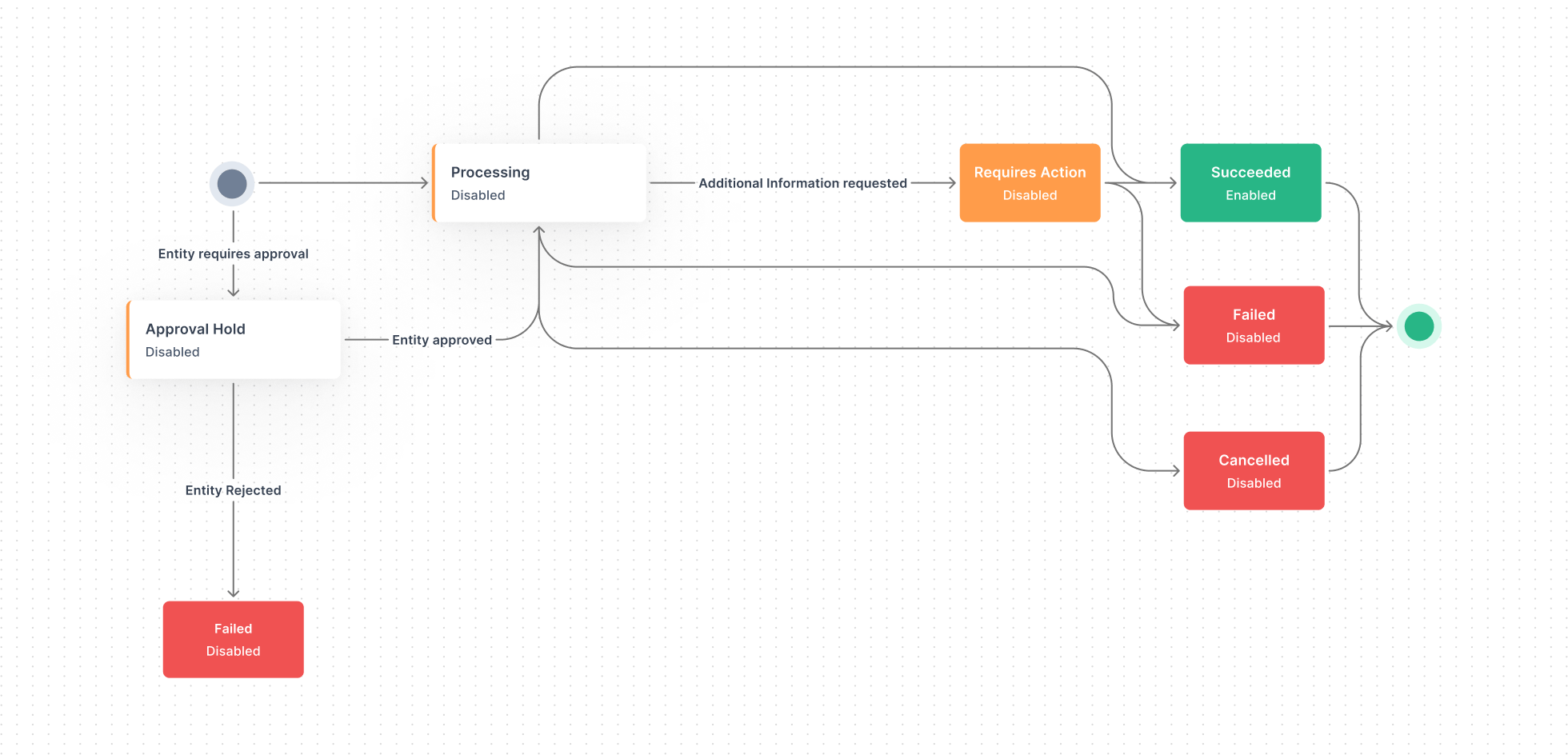
What Each State Means
The states in the diagram are the states of a collection account request (enablement, disablement, or re-enablement). They are not the status of the collection account itself. The account’s status —
enabled or disabled — is what tells you whether it can receive funds at that point in time, and it is derived from how the latest request progresses (see Status by Request State below).| Request State | Meaning |
|---|---|
| Processing | The request has been accepted and Tazapay is working through it. |
| Requires Action | Tazapay needs additional input or action from you before the request can continue. |
| Approval Hold | The entity on behalf of which the collection account is created requires approval before the request can proceed. |
| Succeeded | (Terminal) The request completed successfully. For an enablement request, the account status becomes enabled; for a disablement request, it becomes disabled. |
| Failed | (Terminal) The request could not be completed. The account status is unchanged from before the request. |
| Cancelled | (Terminal) The request was cancelled before completing. The account status is unchanged from before the request. |
Status by Request State
| Request State | Account Status — Enablement | Account Status — Disablement |
|---|---|---|
| Processing | Disabled | Enabled |
| Requires Action | Disabled | Enabled |
| Approval Hold | Disabled | Enabled |
| Succeeded | Enabled | Disabled |
| Failed | Disabled | Enabled |
| Cancelled | Disabled | Enabled |
Webhook Events
Subscribe to the following events to track the full lifecycle of your collection account creation requests:| Event | Description |
|---|---|
collection_account.creation_succeeded | The collection account has been successfully enabled and is ready to receive funds. |
collection_account.creation_failed | The collection account creation request failed. |
collection_account.creation_requires_action | Action is required from you before the creation can proceed. |
collection_account.creation_under_approval_hold | The creation request is under review and pending approval by Tazapay. |
collection_account.creation_under_processing | The creation request is being processed. |
collection_account.creation_cancelled | The creation request was cancelled. |
Other Ways to Request
Request via Dashboard
Create collection accounts from the Tazapay dashboard. (Beta)
Request via Support Team
Reach out to Tazapay support or your account manager.