
The Core Concept -
Tazapay supports reusable KYC/KYB, allowing platforms to share pre-verified applicant data via API. If your platform already conducts KYC/KYB verification through Sumsub, this enables Tazapay to reuse that data removing the need for end-users to re-verify. The flow works via tokens:- The platform (the ‘Donor’) generates a
shareTokenfor a verified Sumsub applicant. - The token is passed to Tazapay (the ‘Recipient’) via the Create Entity or Update Entity API
- Tazapay retrieves the applicant’s documents from Sumsub and runs its own verification checks.
- The entity is created on Tazapay, no document re-upload is required from the end user.
Important nuance: Documents are reused, not the verification itself. Tazapay still runs full KYC/KYB checks on the shared data for regulatory compliance.
Understanding the Two Tokens —
| Partner Token | Share Token | |
|---|---|---|
| Purpose | Links your Sumsub account to Tazapay’s (one-time partnership setup) | Shares one specific applicant’s data |
| Generated by | Tazapay (given to you offline via Sales POC) | Your platform’s backend, via Sumsub’s API |
| Used where | Sumsub Dashboard → Reusable Identity → Partners → Recipients | Tazapay’s Entity API (onboarding_package_url field) |
| Frequency | Once | Per applicant |
Section A: Ops/Admin Setup (4 Steps)
- Enable Reusable KYC on Sumsub — Contact your Sumsub CSM to get your account enabled as a “Donor.” Sumsub requires a signed sharing agreement.
- Contact Tazapay Sales POC — Request enablement of Sumsub Reusable KYC. Tazapay will: accept your platform as a Donor, give you a one-time partner token, and share their Sumsub
forClientId. - Add Tazapay as a Recipient on your Sumsub dashboard — Go to Reusable Identity → Partners → Recipients, click ”+ Add recipient,” paste Tazapay’s partner token, and click Done.
- Verify the partnership — Confirm the partnership is active on both sides: Tazapay shows up as a Recipient on your dashboard, and your platform shows up as a Donor on Tazapay’s. You also need the
forClientIdin hand.
Section B: Developer Integration (2 API Steps)
Step 1 — Generate a Share Token (Sumsub API) CallPOST https://api.sumsub.com/resources/accessTokens/shareToken with:
applicantId: the Sumsub ID of the verified user on your platformforClientId: Tazapay’s Sumsub Client ID
token — this is the shareToken.
Recommended: Set ttlInSecs to 86400 (1 day) when generating the share token. This gives Tazapay sufficient time to consume the token without it expiring prematurely.
Step 2 — Pass the Share Token to Tazapay (Entity API)
Send the token in the onboarding_package_url field when calling:
POST https://service.tazapay.com/v3/entity(Create Entity), orPUT https://api.tazapay.com/v3/entity/{entity_id}(Update Entity)
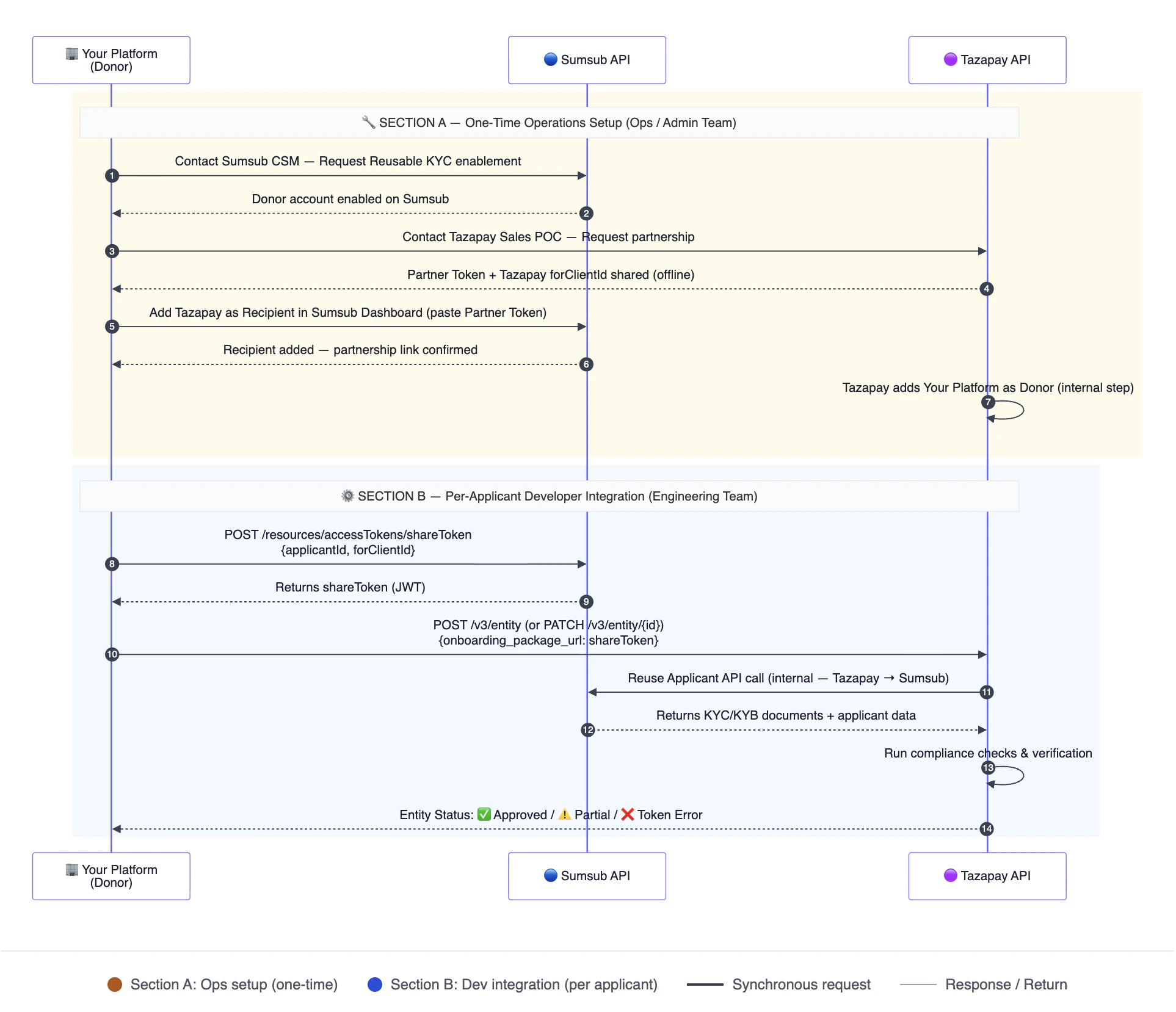
Possible Outcomes After Passing the Token
- Full Approval — All documents meet Tazapay’s requirements. The entity is approved and ready for transactions.
- Partial Completion — Some data passes; The entity is created but enters a Documents Requested state. Additional documents must be submitted to complete onboarding.
- Token Error — Token expired or invalid. Generate a new share token and resubmit via the Entity API.
What Data Can Be Reused
Identity documents, proof of address, biometric/liveness data, questionnaire responses (if structure matches), standard applicant profile fields, and email/phone confirmation status.Summary of Ownership
| Task | Owner |
|---|---|
| Enable Reusable KYC on Sumsub | Your Ops/Compliance team |
| Contact Tazapay Sales POC | Your Ops/Sales team |
| Add Tazapay as Recipient on Sumsub | Your Ops team |
Get forClientId | Tazapay Sales POC |
| Backend Share Token API integration | Your Engineering team |
| Passing token via Tazapay Entity API | Your Engineering team |