
You can create Collection Accounts (Virtual Accounts and Stablecoin Wallets) for yourself or for your entities programmatically via the Tazapay API. Collection Accounts can only be created once you or your entity has been onboarded on Tazapay and approved by our team.Documentation Index
Fetch the complete documentation index at: https://developer.tazapay.com/llms.txt
Use this file to discover all available pages before exploring further.
Before creating a collection account, call the Metadata API to discover which account types, currencies, and payment method types are available for your account.
High-level Flow
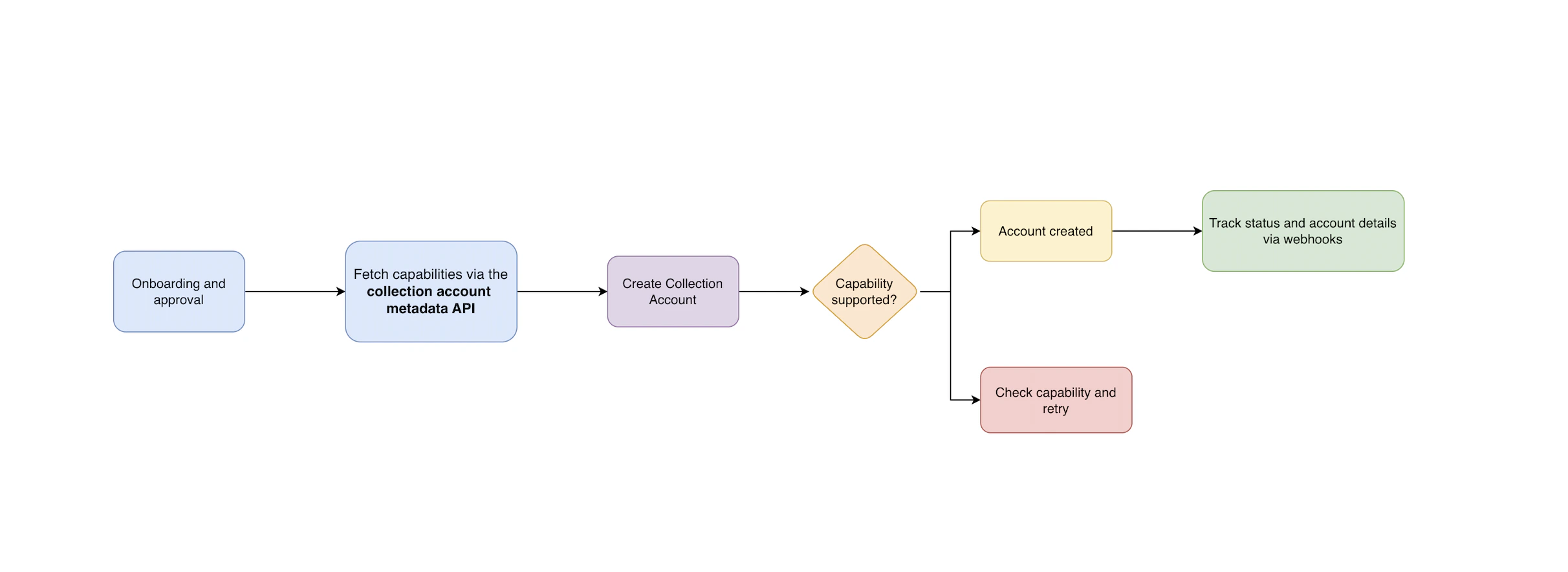
Onboarding and Approval
Ensure you or your entity has been onboarded on Tazapay and approved by our team before making API calls.
Check the Metadata API
Call the Collection Account Metadata API to discover:
- Available payment method types for your account
- Supported currencies and domicile countries
- Transfer limits and
on_behalf_ofrestrictions
Create the Account
Call the Collection Account Creation API with your requirements — account type, country, currencies, and payment method type.If Tazapay can fulfill the requirements, a Collection Account object is created with status
disabled and an initial enablement request.Track via Webhooks
Subscribe to webhook events to receive real-time status updates as the enablement request progresses. Once the request succeeds, the account status changes to
enabled and is ready to receive funds.Collection Account Status Flow
Every Collection Account has a status — eitherenabled or disabled — that tells you whether it can currently receive funds.
This status is not set directly. Instead, it is determined by the state of requests associated with the account. Each time you want to enable, disable, or re-enable an account, a request is created and goes through its own lifecycle. The account status updates automatically based on how that request progresses.
There are three types of requests:
| Request Type | What it does |
|---|---|
| Enablement | Activates the account so it can start receiving funds. Created automatically when the account is first set up. |
| Disablement | Deactivates the account so it stops accepting incoming payments. |
| Re-enablement | Reactivates a previously disabled account, if the account supports it. |
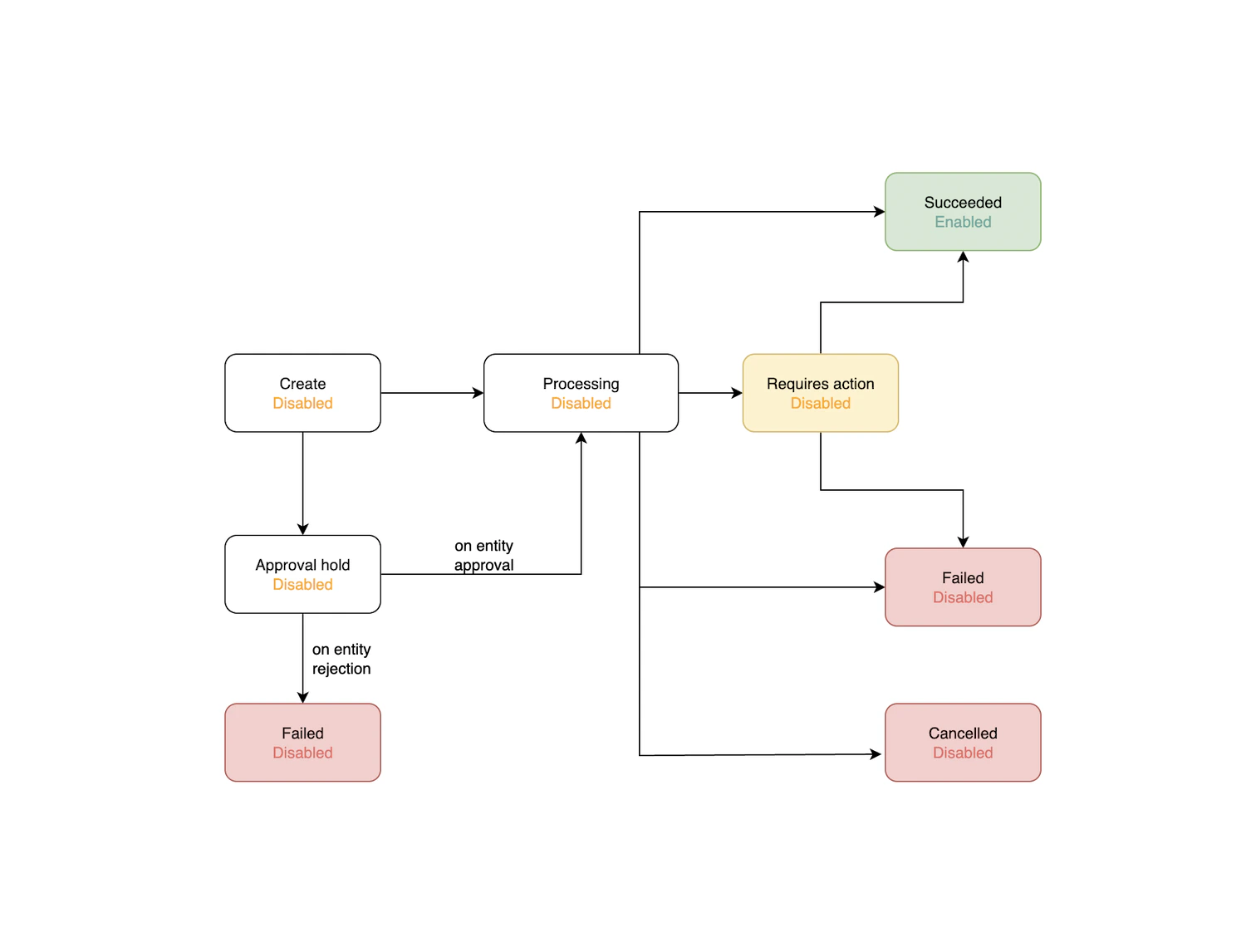
Status by Request State
| Request State | Account Status — Enablement | Account Status — Disablement |
|---|---|---|
| Processing | Disabled | Enabled |
| Requires Action | Disabled | Enabled |
| Approval Hold | Disabled | Enabled |
| Succeeded | Enabled | Disabled |
| Failed | Disabled | Enabled |
| Cancelled | Disabled | Enabled |
Webhook Events
Subscribe to the following events to track the full lifecycle of your collection accounts:| Event | Description |
|---|---|
collection_account.creation_succeeded | The collection account has been successfully enabled and is ready to receive funds. |
collection_account.creation_failed | The collection account creation request failed. |
collection_account.creation_requires_action | Action is required from you before the creation can proceed. |
collection_account.creation_under_approval_hold | The creation request is under review and pending approval by Tazapay. |
collection_account.creation_under_processing | The creation request is being processed. |
collection_account.creation_cancelled | The creation request was cancelled. |
collection_account.disablement_succeeded | The collection account has been successfully disabled. |
collection_account.disablement_failed | The disablement request failed. |
collection_account.disablement_requires_action | Action is required from you before the disablement can proceed. |
collection_account.disablement_under_processing | The disablement request is being processed. |
collection_account.disablement_cancelled | The disablement request was cancelled. |
Closing a Collection Account
To close (disable) a collection account, call the Disable Collection Account API:- The account status remains
enabledwhile the request is in progress. - Webhook events are sent as the request moves through each state.
- On success, the account transitions to
disabledand will no longer accept incoming payments.
Coverage
See the full list of supported virtual account and stablecoin options:Virtual Accounts Coverage
Supported countries, currencies, and transfer modes.
Stablecoins Coverage
Supported stablecoins and blockchain networks.