> ## Documentation Index
> Fetch the complete documentation index at: https://developer.tazapay.com/llms.txt
> Use this file to discover all available pages before exploring further.
# Introduction
> How a payout moves through its states from creation to a terminal outcome, across the different funding and screening flows
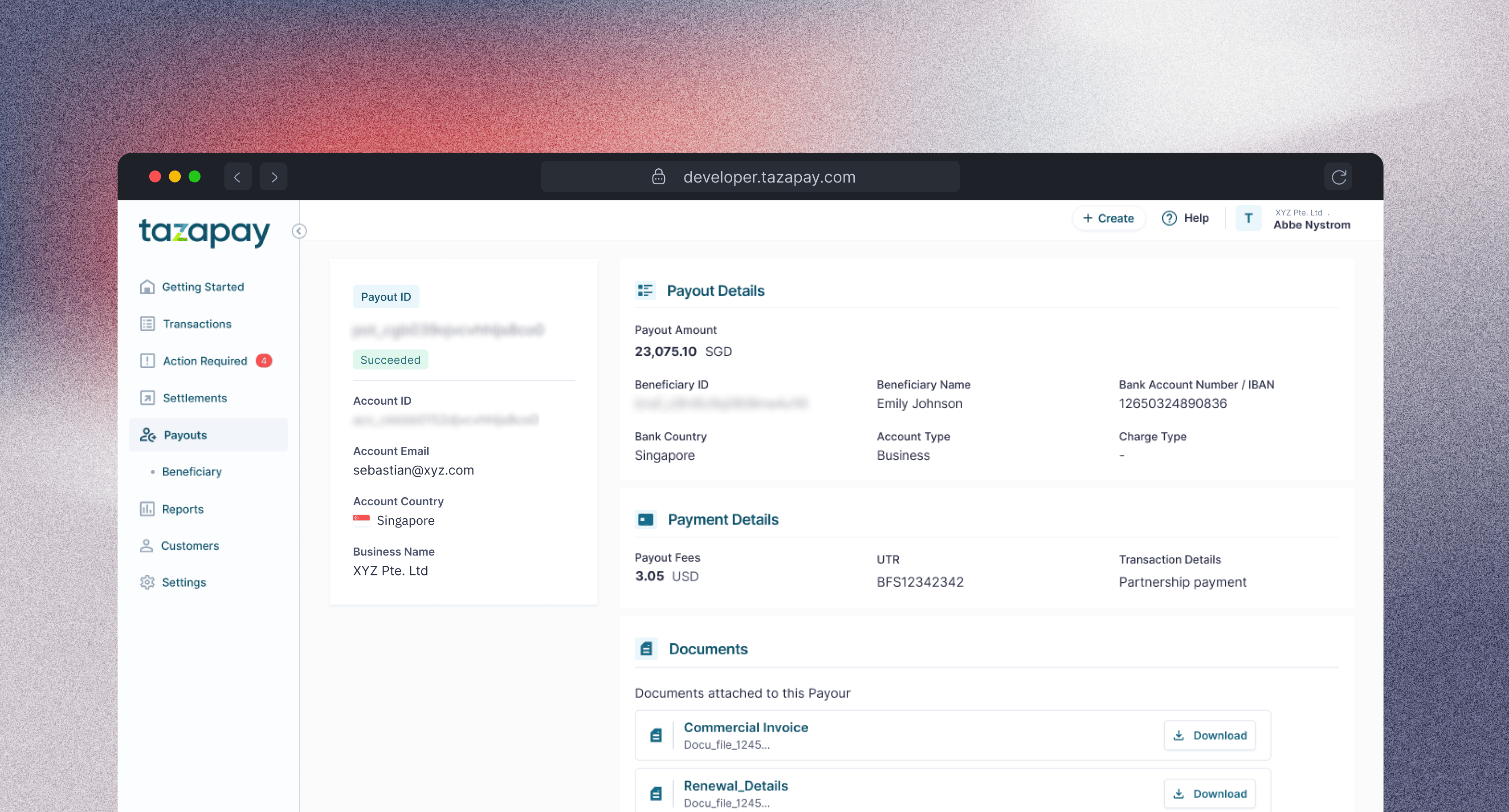 A payout refers to the distribution of funds to recipients across different geographies and currencies.
Tazapay's payout product supports multiple transfer methods:
* **Local Bank Transfers** – Send funds directly to a recipient's local bank account in their native currency, offering faster settlements and lower fees.
* **SWIFT Transfers** – Leverage the global SWIFT network to transfer funds across banks worldwide in multiple currencies.
* **Stablecoin Payouts** – Enable fast, cost-efficient payouts using supported stablecoins for global beneficiaries.
With a single API, Tazapay allows businesses to convert and send money in **100+ currencies**. Use cases include paying international employees, freelancers, vendors, and partners—making cross-border payouts simple, scalable, and reliable.
***
## State Machine
Every payout moves through a defined set of states from the moment it is created to the point where it is paid out (or returned). The exact path depends on **when the payout is funded** and **when it is screened**. This page walks through the three common flows and explains what each state means.
***
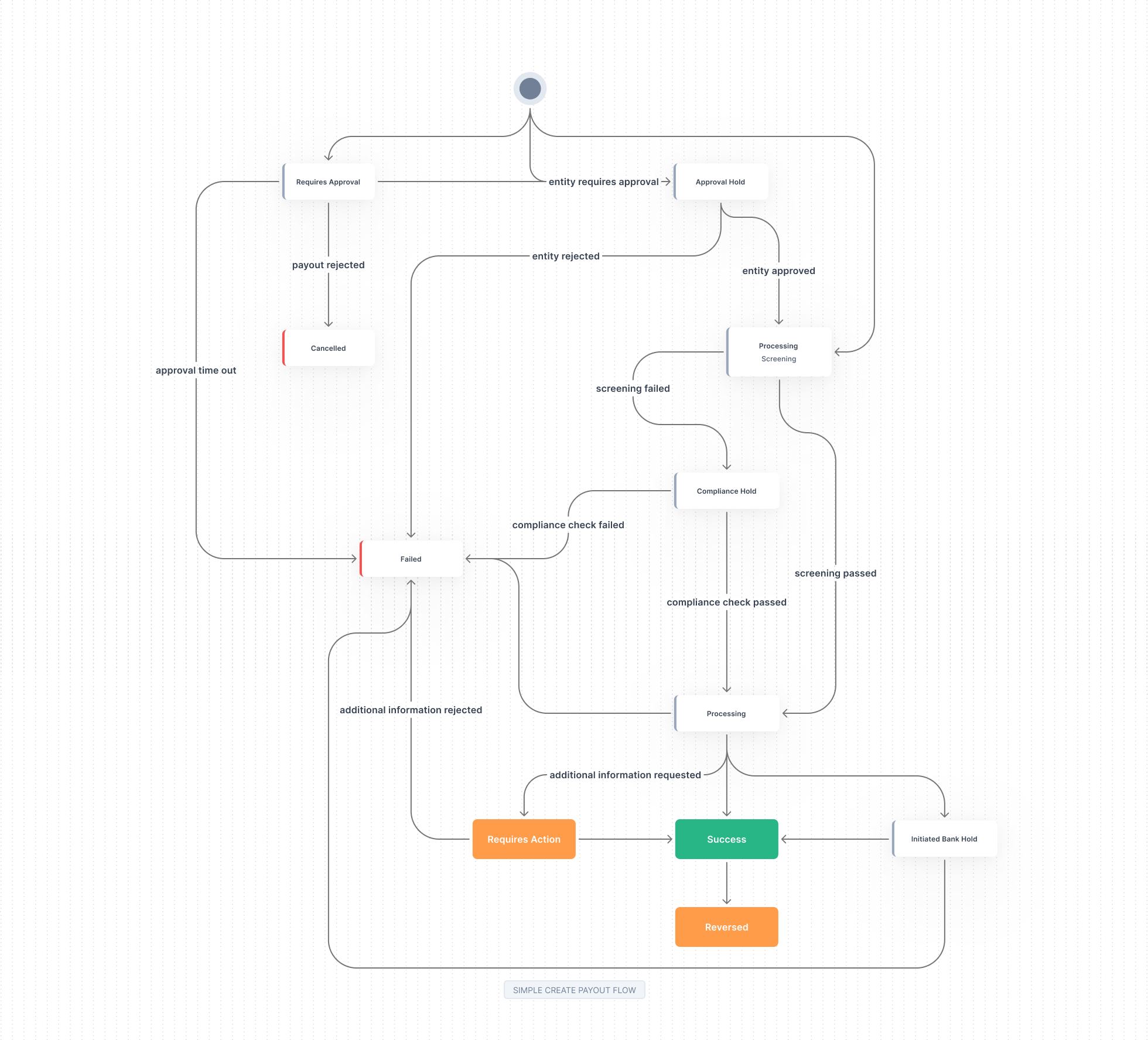
## Flow 1 — Funds Available Before Creating the Payout
In the simplest flow, the source funds are already available in your balance before you create the payout. The payout is created, screened, and then processed for settlement without waiting for funding.
A payout refers to the distribution of funds to recipients across different geographies and currencies.
Tazapay's payout product supports multiple transfer methods:
* **Local Bank Transfers** – Send funds directly to a recipient's local bank account in their native currency, offering faster settlements and lower fees.
* **SWIFT Transfers** – Leverage the global SWIFT network to transfer funds across banks worldwide in multiple currencies.
* **Stablecoin Payouts** – Enable fast, cost-efficient payouts using supported stablecoins for global beneficiaries.
With a single API, Tazapay allows businesses to convert and send money in **100+ currencies**. Use cases include paying international employees, freelancers, vendors, and partners—making cross-border payouts simple, scalable, and reliable.
***
## State Machine
Every payout moves through a defined set of states from the moment it is created to the point where it is paid out (or returned). The exact path depends on **when the payout is funded** and **when it is screened**. This page walks through the three common flows and explains what each state means.
***
## Flow 1 — Funds Available Before Creating the Payout
In the simplest flow, the source funds are already available in your balance before you create the payout. The payout is created, screened, and then processed for settlement without waiting for funding.
 ***
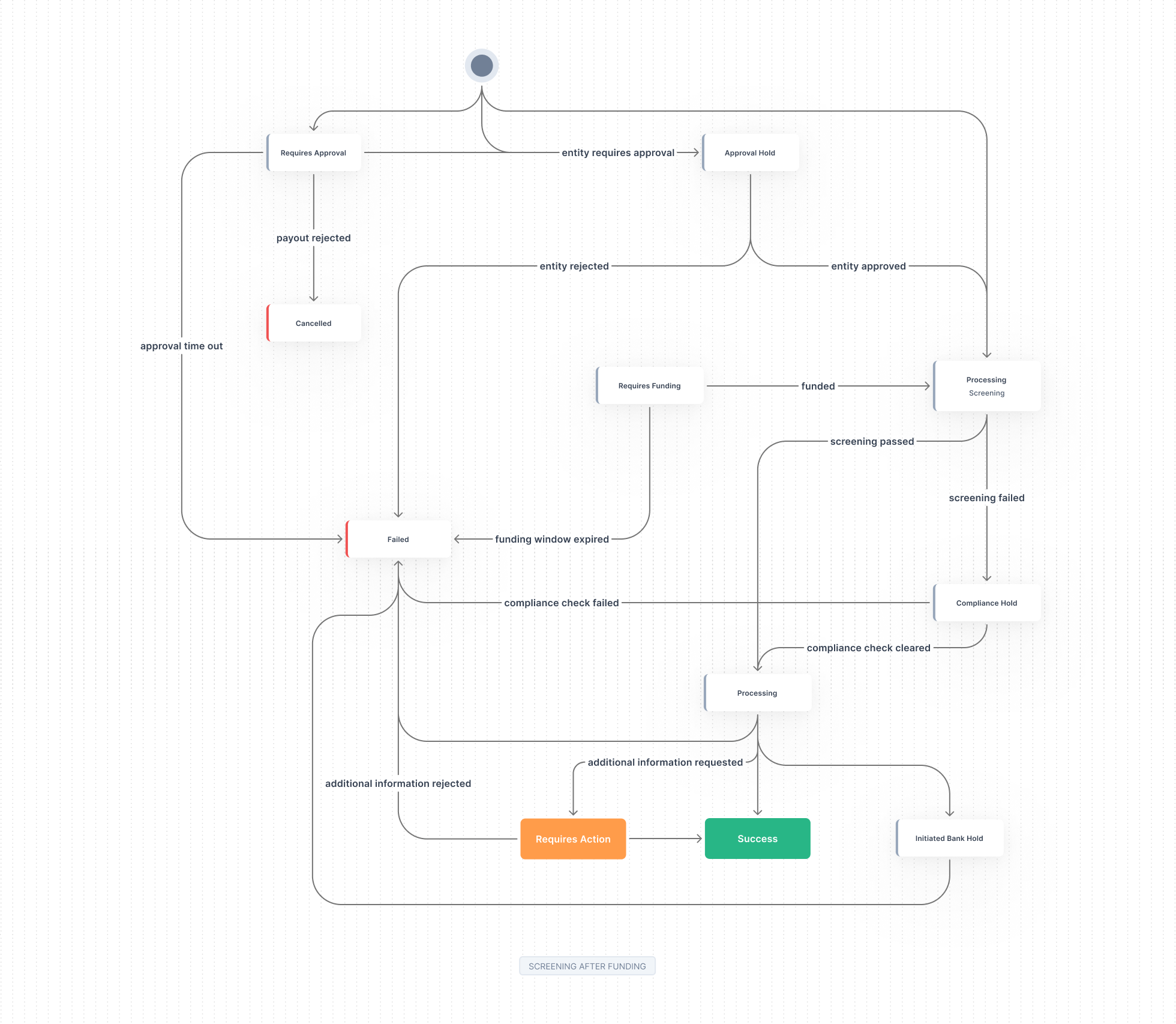
## Flow 2 — Funding After Creating the Payout
Here the payout is created before the funds are available. The payout waits in a funding state until your balance is funded — automatically via [FIFO auto-funding](/payouts/capabilities/funding-a-payout-after-creation) if auto-funding is enabled, or via the Fund API. Once funded, the payout is screened and then processed.
***
## Flow 2 — Funding After Creating the Payout
Here the payout is created before the funds are available. The payout waits in a funding state until your balance is funded — automatically via [FIFO auto-funding](/payouts/capabilities/funding-a-payout-after-creation) if auto-funding is enabled, or via the Fund API. Once funded, the payout is screened and then processed.
 ***
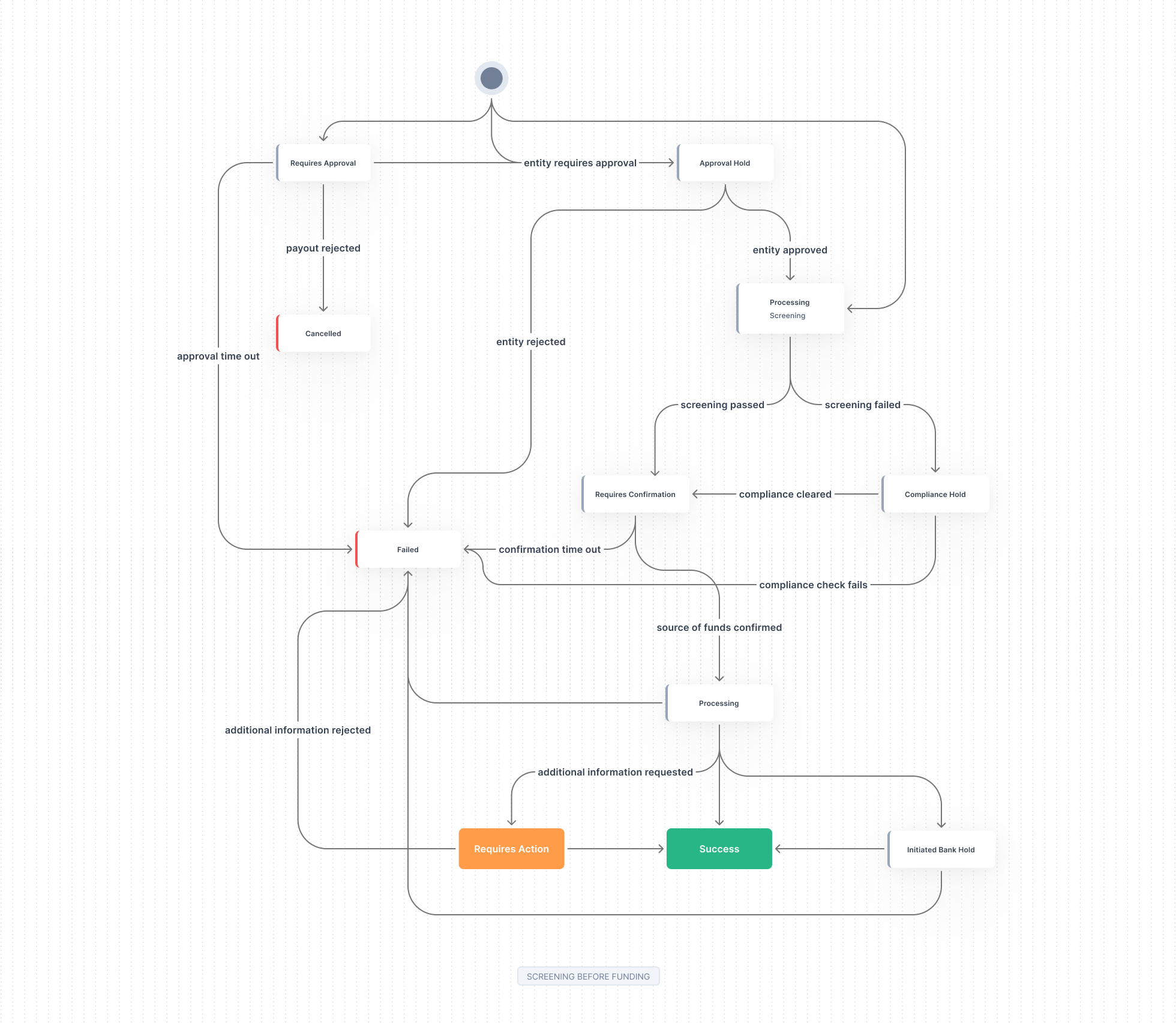
## Flow 3 — Screening Without Funding
In this flow the payout is created and screened first. Only after screening is the **source of funds confirmed** — by attaching a `collect` id that identifies where the funds come from, using the [Confirm Payout API](/api-reference/tazapay-api/confirm-payout).
***
## Flow 3 — Screening Without Funding
In this flow the payout is created and screened first. Only after screening is the **source of funds confirmed** — by attaching a `collect` id that identifies where the funds come from, using the [Confirm Payout API](/api-reference/tazapay-api/confirm-payout).
 ***
## What Each State Means
The states below describe where an individual **payout** is in its lifecycle. Not every payout passes through every state — the path taken depends on the flow above.
| State | Meaning |
| ------------------------- | ------------------------------------------------------------------------------------------------------------------------------------------------------------------------------------------------------------ |
| **Requires Funding** | The payout is waiting for source funds to become available. If auto-funding is enabled, it is funded automatically via FIFO when your balance is credited; otherwise it is funded manually via the Fund API. |
| **Requires Confirmation** | The source of funds needs to be confirmed — the `collect` id that identifies where the funds come from must be confirmed before the payout can proceed. |
| **Requires Action** | Additional input or action is needed from you before the payout can proceed. |
| **Requires Approval** | The creator did not have permission to approve the payout. A user with approval permission needs to approve it before it can continue. |
| **Approval Hold** | The entity on behalf of which the payout is created requires approval before the payout can proceed. |
| **Initiator Bank Hold** | The payout has been put on hold by the initiator (sending) bank. |
| **Compliance Hold** | The payout is paused while Tazapay completes compliance and screening checks. |
| **Processing** | The payout has cleared funding, confirmation, and screening and is being settled to the beneficiary. |
| **Succeeded** | *(Terminal)* The funds have been successfully paid out to the beneficiary. |
| **Failed** | *(Terminal)* The payout could not be completed. Any funds that were debited are returned. |
| **Cancelled** | *(Terminal)* The payout was cancelled before completion. |
| **Reversed** | *(Terminal)* The payout was returned after settlement — for example, by the beneficiary bank. See [Reversals](/payouts/reversals/overview). |
***
## See Also
How auto-funding (FIFO) and the Fund API work.
What happens when a payout is returned after settlement.
Track payout state transitions via webhook events.
***
## What Each State Means
The states below describe where an individual **payout** is in its lifecycle. Not every payout passes through every state — the path taken depends on the flow above.
| State | Meaning |
| ------------------------- | ------------------------------------------------------------------------------------------------------------------------------------------------------------------------------------------------------------ |
| **Requires Funding** | The payout is waiting for source funds to become available. If auto-funding is enabled, it is funded automatically via FIFO when your balance is credited; otherwise it is funded manually via the Fund API. |
| **Requires Confirmation** | The source of funds needs to be confirmed — the `collect` id that identifies where the funds come from must be confirmed before the payout can proceed. |
| **Requires Action** | Additional input or action is needed from you before the payout can proceed. |
| **Requires Approval** | The creator did not have permission to approve the payout. A user with approval permission needs to approve it before it can continue. |
| **Approval Hold** | The entity on behalf of which the payout is created requires approval before the payout can proceed. |
| **Initiator Bank Hold** | The payout has been put on hold by the initiator (sending) bank. |
| **Compliance Hold** | The payout is paused while Tazapay completes compliance and screening checks. |
| **Processing** | The payout has cleared funding, confirmation, and screening and is being settled to the beneficiary. |
| **Succeeded** | *(Terminal)* The funds have been successfully paid out to the beneficiary. |
| **Failed** | *(Terminal)* The payout could not be completed. Any funds that were debited are returned. |
| **Cancelled** | *(Terminal)* The payout was cancelled before completion. |
| **Reversed** | *(Terminal)* The payout was returned after settlement — for example, by the beneficiary bank. See [Reversals](/payouts/reversals/overview). |
***
## See Also
How auto-funding (FIFO) and the Fund API work.
What happens when a payout is returned after settlement.
Track payout state transitions via webhook events.