> ## Documentation Index
> Fetch the complete documentation index at: https://developer.tazapay.com/llms.txt
> Use this file to discover all available pages before exploring further.
# Collections on behalf of
Tazapay's **Collections on Behalf Of (COBO)** capability allows platforms / fintechs to receive funds on behalf of their customers which can be individual or business. Tazapay can configure **virtual accounts** or **stablecoin wallets** for your customers to receive payments.
This ensures compliance, traceability, and correct attribution of incoming funds.
***
## High-level Flow
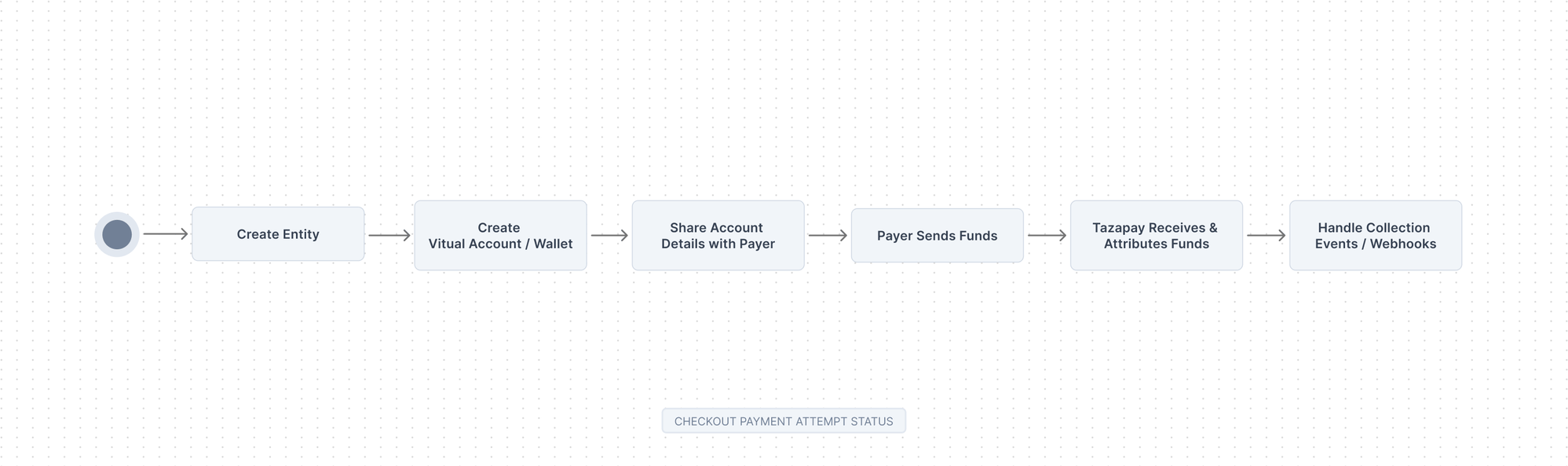 1. Create an **Entity** (Individual or Business)
2. Create a **Virtual Account** or **Stablecoin Wallet**
3. Share account details with the **Payer**
4. Receive and attribute **Incoming Funds**
5. Handle **Collection Events / Webhooks**
***
## Step 1: Create an Entity (Individual or Business)
An Entity represents a platform's or fintech's customer — the party on whose behalf the collection is being made. Every virtual account or wallet must be associated with an entity.
Tazapay supports two entity types:
* **Business Entity** – for registered companies
* **Individual Entity** – for individual customers (e.g., freelancers, creators, sole proprietors)
Only entities with status **submitted** can be used to create virtual accounts or wallets.
### Relevant Links
1. [Business Entity Requirements - Full Onboarding](/getting-started/overview/onboarding-requirements)
2. [Individual Entity Requirements - Full Onboarding](/getting-started/overview/onboarding-requirements)
3. [Entity Requirements - Simplified Onboarding](/Global-Money-Movement/connected-accounts/simplified-entity-creation)
4. [Create Entity API](/api-reference/tazapay-api/create-entity)
5. [Submit Entity API](/api-reference/tazapay-api/submit-entity-business)
***
## Step 2: Create a Virtual Account or Stablecoin Wallet
Once you have a submitted entity, you can create a collection destination for them.
Tazapay supports two collection destination types:
Bank account numbers that can receive local or international transfers. Funds are automatically attributed to the associated entity.
Blockchain wallet addresses for receiving stablecoin payments (e.g., USDC, USDT). Ideal for crypto-native businesses.
### Virtual Account Features
| Feature | Description |
| ------------------- | ----------------------------------------------------- |
| Multi-currency | Support for multiple currencies per entity |
| Local rails | Receive domestic transfers with local account numbers |
| International | Receive SWIFT/wire transfers |
| Auto-reconciliation | Incoming funds automatically matched to entity |
### Stablecoin Wallet Features
| Feature | Description |
| ---------------- | ---------------------------------------- |
| Supported tokens | USDC, USDT (network availability varies) |
| Networks | Multiple blockchain networks supported |
| Auto-conversion | Optional conversion to fiat on receipt |
| Real-time | Near-instant settlement |
### Relevant Links
* [Request Collection Accounts via Support Team](/collection-accounts/requesting-for-vas/support-team)
* [Collection Account Webhooks](/api-reference/tazapay-api/collection-account-webhooks)
***
## Step 3: Share Account Details with Payer
Once the virtual account or wallet is created, share the account details with the payer (your customer's customer or counterparty).
You can retrieve the account details programmatically via API and display them in your platform's UI, or send them directly to the payer via email or invoice.
### Virtual Account Details Include
* Account number / IBAN
* Bank name and address
* SWIFT/BIC code (for international transfers)
* Routing number (for local transfers)
* Reference code (for attribution)
### Stablecoin Wallet Details Include
* Wallet address
* Supported networks
* Supported tokens
### Relevant Links
1. [Viewing Virtual Accounts and Stablecoin Wallets](/collection-accounts/viewing-va/dashboard)
***
## Step 4: Receive and Attribute Incoming Funds
When a payer sends funds to the virtual account or wallet:
1. Tazapay receives the incoming transfer
2. Funds are automatically attributed to the associated entity
3. A webhook notification is sent to your platform
***
## Step 5: Handle Collection Events & Webhooks
Tazapay sends **webhooks** to notify you of collection events. You should always rely on webhooks (not polling) for real-time fund attribution.
### Relevant Links
1. [Collect Webhook Events](/api-reference/tazapay-api/collect-webhook)
2. [Collect State Machine](/collection-accounts/incoming-payments/state-machine)
3. [Get Collect API](/api-reference/tazapay-api/fetch-collect)
### Best Practices
Always validate webhook signatures to ensure authenticity and prevent spoofing.
Handle duplicate webhook deliveries gracefully by tracking processed event IDs.
Maintain a log of all collection events for reconciliation and audit purposes.
Set up alerts for unexpected collection patterns or failed attributions.
1. Create an **Entity** (Individual or Business)
2. Create a **Virtual Account** or **Stablecoin Wallet**
3. Share account details with the **Payer**
4. Receive and attribute **Incoming Funds**
5. Handle **Collection Events / Webhooks**
***
## Step 1: Create an Entity (Individual or Business)
An Entity represents a platform's or fintech's customer — the party on whose behalf the collection is being made. Every virtual account or wallet must be associated with an entity.
Tazapay supports two entity types:
* **Business Entity** – for registered companies
* **Individual Entity** – for individual customers (e.g., freelancers, creators, sole proprietors)
Only entities with status **submitted** can be used to create virtual accounts or wallets.
### Relevant Links
1. [Business Entity Requirements - Full Onboarding](/getting-started/overview/onboarding-requirements)
2. [Individual Entity Requirements - Full Onboarding](/getting-started/overview/onboarding-requirements)
3. [Entity Requirements - Simplified Onboarding](/Global-Money-Movement/connected-accounts/simplified-entity-creation)
4. [Create Entity API](/api-reference/tazapay-api/create-entity)
5. [Submit Entity API](/api-reference/tazapay-api/submit-entity-business)
***
## Step 2: Create a Virtual Account or Stablecoin Wallet
Once you have a submitted entity, you can create a collection destination for them.
Tazapay supports two collection destination types:
Bank account numbers that can receive local or international transfers. Funds are automatically attributed to the associated entity.
Blockchain wallet addresses for receiving stablecoin payments (e.g., USDC, USDT). Ideal for crypto-native businesses.
### Virtual Account Features
| Feature | Description |
| ------------------- | ----------------------------------------------------- |
| Multi-currency | Support for multiple currencies per entity |
| Local rails | Receive domestic transfers with local account numbers |
| International | Receive SWIFT/wire transfers |
| Auto-reconciliation | Incoming funds automatically matched to entity |
### Stablecoin Wallet Features
| Feature | Description |
| ---------------- | ---------------------------------------- |
| Supported tokens | USDC, USDT (network availability varies) |
| Networks | Multiple blockchain networks supported |
| Auto-conversion | Optional conversion to fiat on receipt |
| Real-time | Near-instant settlement |
### Relevant Links
* [Request Collection Accounts via Support Team](/collection-accounts/requesting-for-vas/support-team)
* [Collection Account Webhooks](/api-reference/tazapay-api/collection-account-webhooks)
***
## Step 3: Share Account Details with Payer
Once the virtual account or wallet is created, share the account details with the payer (your customer's customer or counterparty).
You can retrieve the account details programmatically via API and display them in your platform's UI, or send them directly to the payer via email or invoice.
### Virtual Account Details Include
* Account number / IBAN
* Bank name and address
* SWIFT/BIC code (for international transfers)
* Routing number (for local transfers)
* Reference code (for attribution)
### Stablecoin Wallet Details Include
* Wallet address
* Supported networks
* Supported tokens
### Relevant Links
1. [Viewing Virtual Accounts and Stablecoin Wallets](/collection-accounts/viewing-va/dashboard)
***
## Step 4: Receive and Attribute Incoming Funds
When a payer sends funds to the virtual account or wallet:
1. Tazapay receives the incoming transfer
2. Funds are automatically attributed to the associated entity
3. A webhook notification is sent to your platform
***
## Step 5: Handle Collection Events & Webhooks
Tazapay sends **webhooks** to notify you of collection events. You should always rely on webhooks (not polling) for real-time fund attribution.
### Relevant Links
1. [Collect Webhook Events](/api-reference/tazapay-api/collect-webhook)
2. [Collect State Machine](/collection-accounts/incoming-payments/state-machine)
3. [Get Collect API](/api-reference/tazapay-api/fetch-collect)
### Best Practices
Always validate webhook signatures to ensure authenticity and prevent spoofing.
Handle duplicate webhook deliveries gracefully by tracking processed event IDs.
Maintain a log of all collection events for reconciliation and audit purposes.
Set up alerts for unexpected collection patterns or failed attributions.