> ## Documentation Index
> Fetch the complete documentation index at: https://developer.tazapay.com/llms.txt
> Use this file to discover all available pages before exploring further.
# State Machine
> How a collect moves through its possible states from creation to a terminal outcome
Every collect moves through a defined set of states from the moment funds are detected to the point where they are credited (or returned). Understanding these states helps you build robust reconciliation, alerting, and customer-facing flows.
***
## Possible Paths
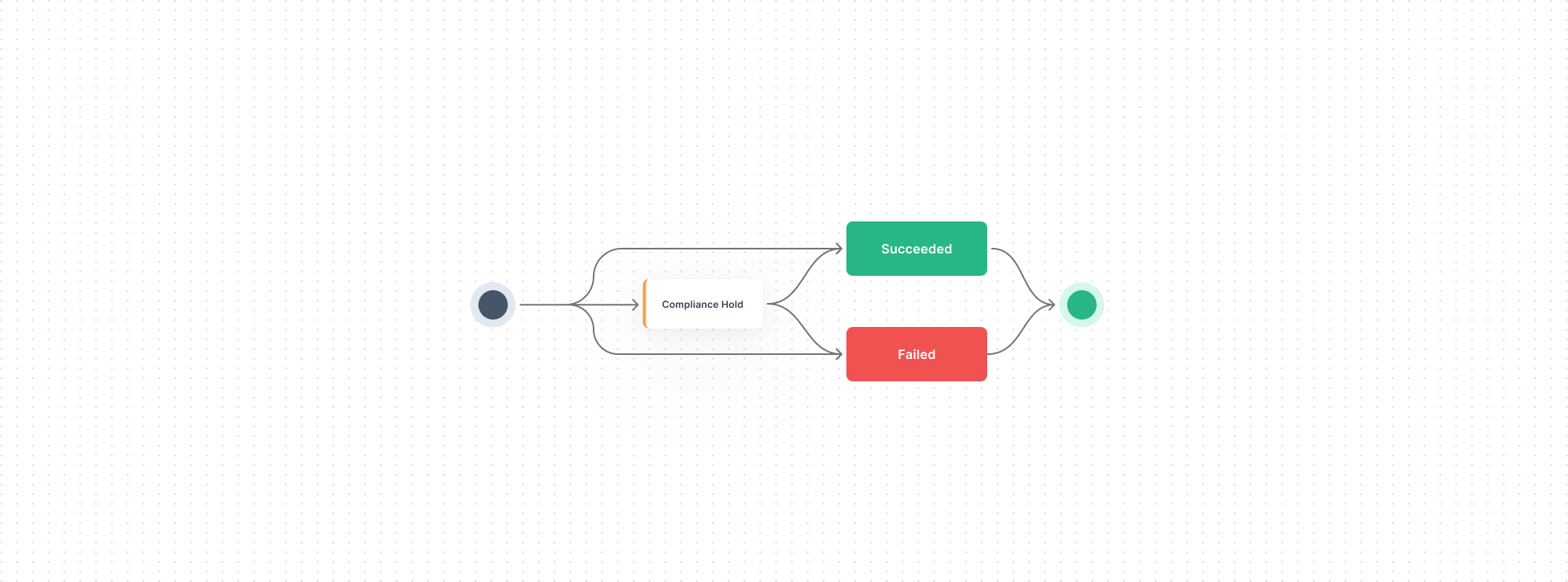
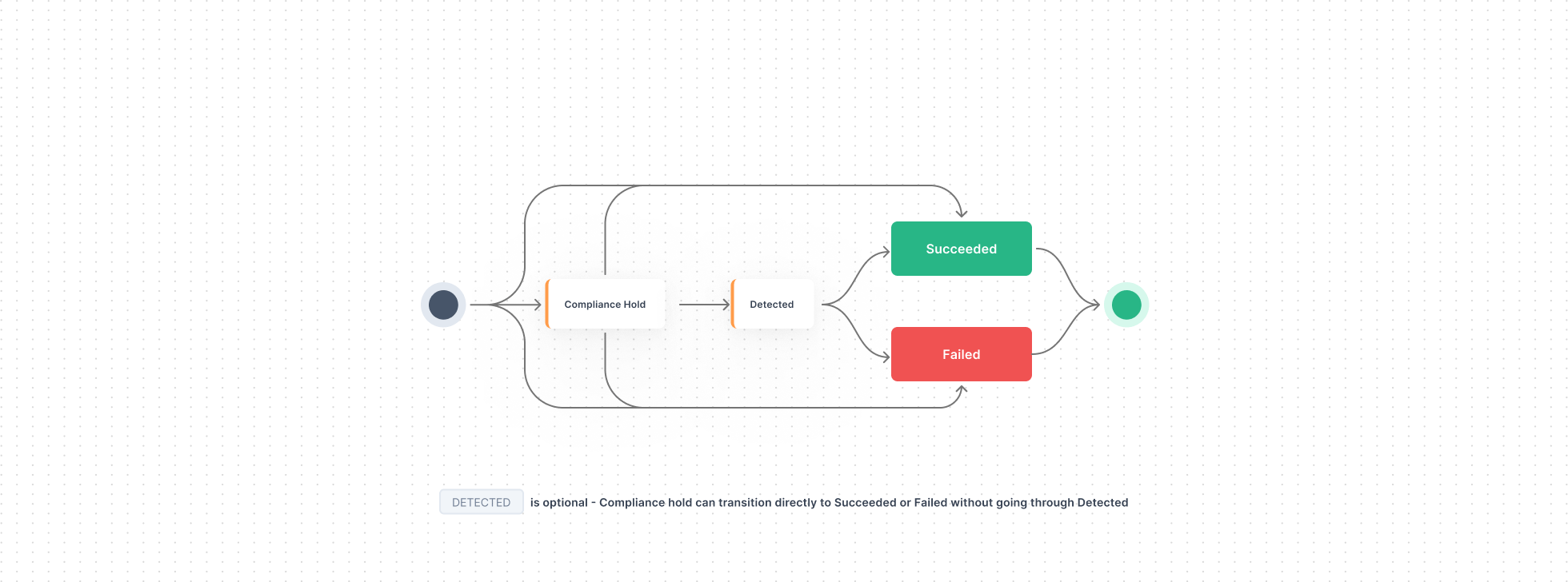
A collect can take one of the following paths:
### Virtual Accounts and Wallets
* **Incoming Payment → Succeeded** — credited directly.
* **Incoming Payment → Failed** — failed directly.
* **Incoming Payment → Compliance Hold → Succeeded** — placed on hold, then credited.
* **Incoming Payment → Compliance Hold → Failed** — placed on hold, then rejected.
### Wallets Only
* **Incoming Payment → Compliance Hold → Detected → Succeeded** — placed on hold, detected on-chain, then credited.
* **Incoming Payment → Compliance Hold → Detected → Failed** — placed on hold, detected on-chain, then rejected.
The `Detected` state is specific to stablecoin wallets and indicates that the blockchain transaction has been seen but is awaiting final confirmation.
***
## Diagram — Virtual Accounts
 ## Diagram — Stablecoin Wallets
`Detected` is optional — Compliance Hold can transition directly to Succeeded or Failed without going through Detected.
## Diagram — Stablecoin Wallets
`Detected` is optional — Compliance Hold can transition directly to Succeeded or Failed without going through Detected.
 ***
## What Each State Means
The states below describe where an individual **collect** (incoming payment) is in its lifecycle.
| State | Meaning |
| ------------------- | ------------------------------------------------------------------------------------------------------------------------------------------------------------------------------------------------- |
| **Compliance Hold** | The collect is paused while Tazapay completes compliance and screening checks. It can resolve to Succeeded or Failed (or to Detected first, for stablecoin wallets). |
| **Detected** | *(Stablecoin wallets only)* The blockchain transaction has been seen on-chain but is awaiting final confirmation before the funds are credited. |
| **Succeeded** | *(Terminal)* The funds have cleared all checks and have been credited to the balance. |
| **Failed** | *(Terminal)* The collect could not be completed — for example, it was rejected during compliance — and the funds are returned. See [Reversals](/collection-accounts/incoming-payments/reversals). |
***
## See Also
How compliance holds work and how to subscribe to them.
What happens when a collect fails.
Track state transitions via webhook events.
***
## What Each State Means
The states below describe where an individual **collect** (incoming payment) is in its lifecycle.
| State | Meaning |
| ------------------- | ------------------------------------------------------------------------------------------------------------------------------------------------------------------------------------------------- |
| **Compliance Hold** | The collect is paused while Tazapay completes compliance and screening checks. It can resolve to Succeeded or Failed (or to Detected first, for stablecoin wallets). |
| **Detected** | *(Stablecoin wallets only)* The blockchain transaction has been seen on-chain but is awaiting final confirmation before the funds are credited. |
| **Succeeded** | *(Terminal)* The funds have cleared all checks and have been credited to the balance. |
| **Failed** | *(Terminal)* The collect could not be completed — for example, it was rejected during compliance — and the funds are returned. See [Reversals](/collection-accounts/incoming-payments/reversals). |
***
## See Also
How compliance holds work and how to subscribe to them.
What happens when a collect fails.
Track state transitions via webhook events.