> ## Documentation Index
> Fetch the complete documentation index at: https://developer.tazapay.com/llms.txt
> Use this file to discover all available pages before exploring further.
# Fetch Collect Details via Dashboard
> View incoming collects in the Tazapay dashboard
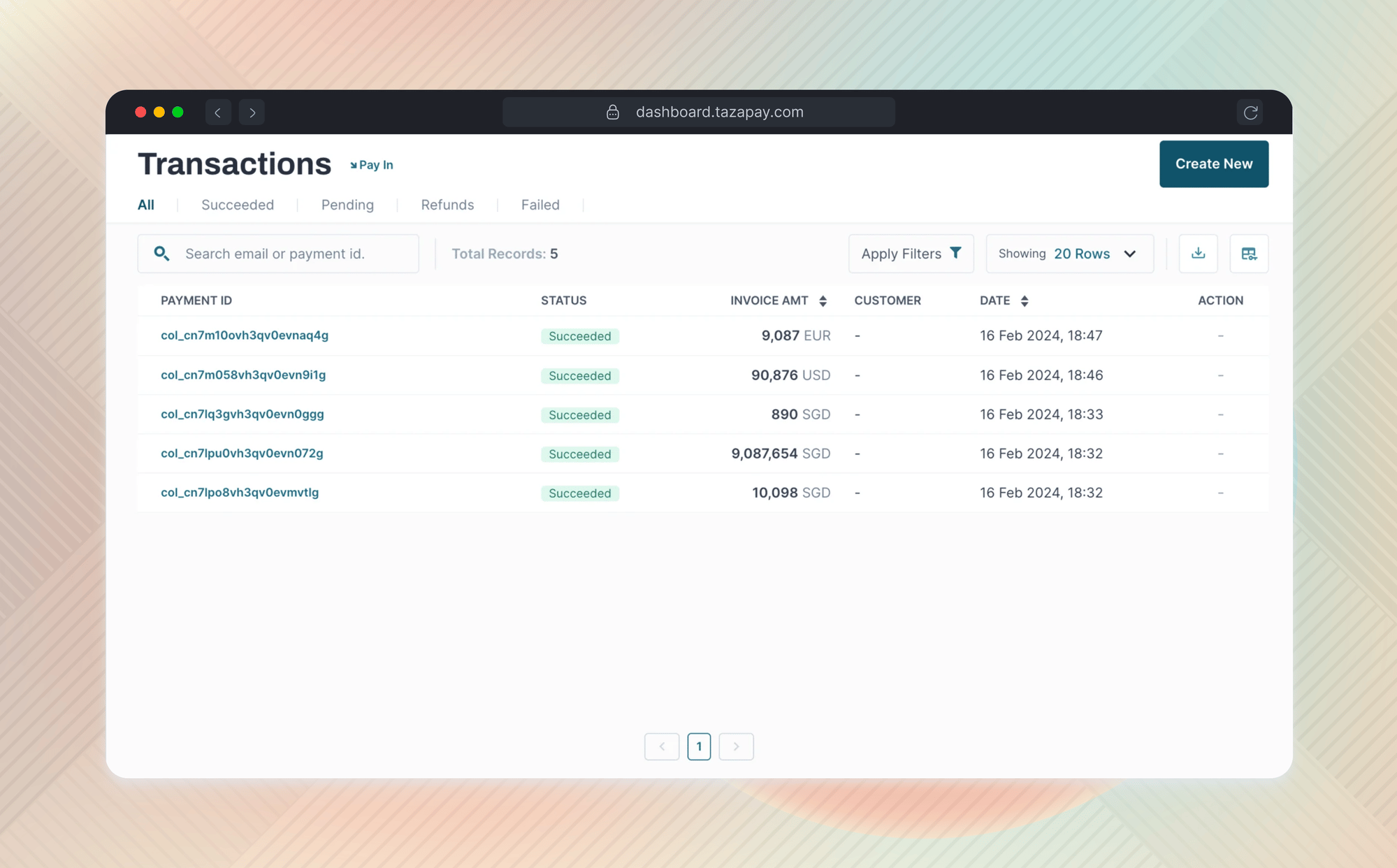
You can view collects in your collection accounts on [Tazapay's dashboard](https://dashboard.tazapay.com/).
## Accessing Transactions
* Once logged in, click on the `Transactions` tab located on the left-hand side vertical navigation bar.
* A listing screen will appear displaying the following columns:
* Payment ID: A unique identifier for each collect, starts with `col_`
* Status: The status of the collect - succeeded, failed or on\_hold
* Invoice Amt: The amount in the currency collected
* Date: The timestamp at which the collect was created
* Payment Method: Indicates whether the collect was made using Local Bank Transfer, Wire Transfer or via Stablecoins.
 ### Searching for collection records
Use the search tab at the top-left corner of the screen to find a specific collect ID. You can perform a full search with the exact ID or a partial search with a part of the ID.
### Viewing Collect Details
To view the expanded details for a collect, you can simply click on the Payment ID starting with `col_` on the `Transactions` screen and it will redirect you to the collection summary screen. The screen will display the following information -
Your business details (Account Details):
| Fields | Description |
| --------------- | ------------------------------------------------------ |
| Account ID | Unique Tazapay Account ID for your registered business |
| Account Email | User Email |
| Account Country | Business Registration Country |
| Business Name | Registered Name of your business |
Collection Details
| Fields | Description |
| ------------------------------- | ------------------------------------------------------------------------------------------------- |
| Collection Amount | The amount credited for the payment |
| Fees | Tazapay Fees for the payment |
| Payment Method | The payment method (Local Bank Transfer or Wire Transfer or Stablecoin) |
| Receiving Account Number / IBAN | The account number (or IBAN in case the currency is EUR) of the receiving account for the payment |
| Status | The status of the collect - its usually `succeeded`. Rarely can be `on_hold` or `failed` |
| Transaction Hash | Unique identifier assigned to this blockchain transaction |
Sender Details
> The availability of this information is subject to the sender entering this in their banking application used to transfer funds
### Virtual Account
| Fields | Description |
| ---------------------- | ---------------------------------------------------------- |
| Name | Name of the sender |
| Bank | The details of the bank account this payment was made from |
| Reference | Any reference number entered by the sender |
| Additional Information | Additional information entered by the sender |
### Wallet
| Fields | Description |
| --------------- | --------------------------------------------------------- |
| Deposit Address | Deposit address of the send on the block chain |
| Type | Type of wallet or blockchain used like Ethereum, Tron etc |
***
## See Also
Retrieve collect details programmatically.
Get notified of new collects in real time.
### Searching for collection records
Use the search tab at the top-left corner of the screen to find a specific collect ID. You can perform a full search with the exact ID or a partial search with a part of the ID.
### Viewing Collect Details
To view the expanded details for a collect, you can simply click on the Payment ID starting with `col_` on the `Transactions` screen and it will redirect you to the collection summary screen. The screen will display the following information -
Your business details (Account Details):
| Fields | Description |
| --------------- | ------------------------------------------------------ |
| Account ID | Unique Tazapay Account ID for your registered business |
| Account Email | User Email |
| Account Country | Business Registration Country |
| Business Name | Registered Name of your business |
Collection Details
| Fields | Description |
| ------------------------------- | ------------------------------------------------------------------------------------------------- |
| Collection Amount | The amount credited for the payment |
| Fees | Tazapay Fees for the payment |
| Payment Method | The payment method (Local Bank Transfer or Wire Transfer or Stablecoin) |
| Receiving Account Number / IBAN | The account number (or IBAN in case the currency is EUR) of the receiving account for the payment |
| Status | The status of the collect - its usually `succeeded`. Rarely can be `on_hold` or `failed` |
| Transaction Hash | Unique identifier assigned to this blockchain transaction |
Sender Details
> The availability of this information is subject to the sender entering this in their banking application used to transfer funds
### Virtual Account
| Fields | Description |
| ---------------------- | ---------------------------------------------------------- |
| Name | Name of the sender |
| Bank | The details of the bank account this payment was made from |
| Reference | Any reference number entered by the sender |
| Additional Information | Additional information entered by the sender |
### Wallet
| Fields | Description |
| --------------- | --------------------------------------------------------- |
| Deposit Address | Deposit address of the send on the block chain |
| Type | Type of wallet or blockchain used like Ethereum, Tron etc |
***
## See Also
Retrieve collect details programmatically.
Get notified of new collects in real time.